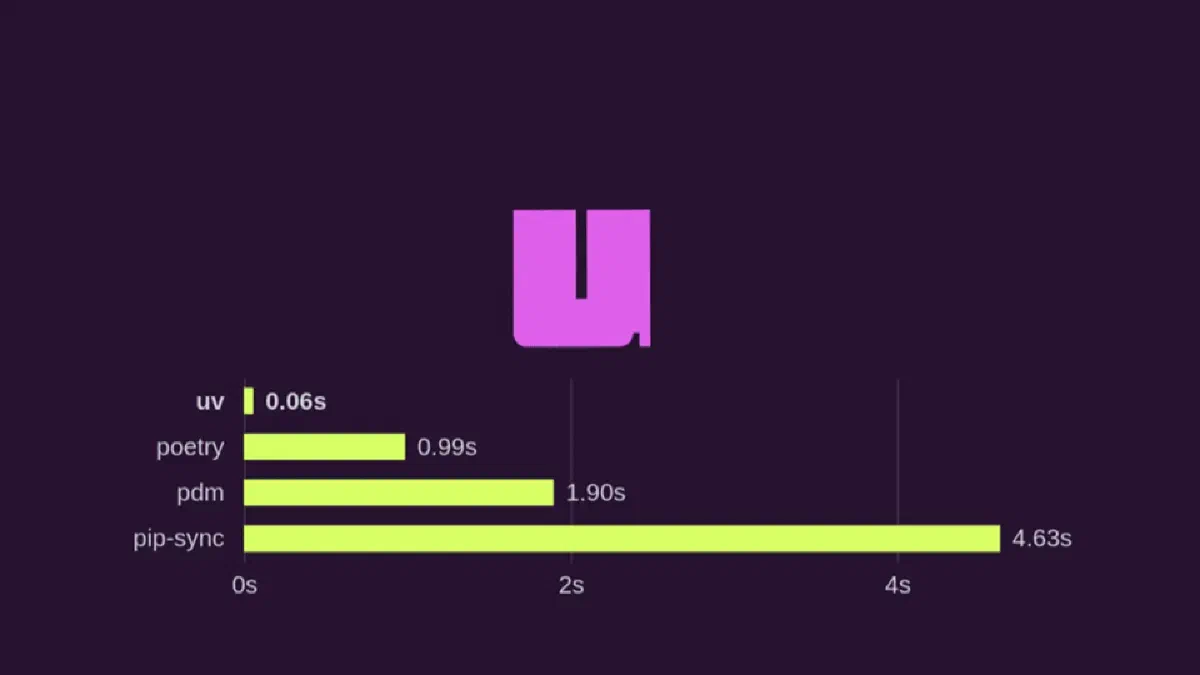
If you still use pip + venv + pip-tools (or Poetry) and feel your Python workflow has become too heavy, it is time to look at uv.
uv is a tool from Astral (the same company behind Ruff) for:
- managing dependencies
- creating and syncing virtual environments
- pinning versions with a lockfile
- running scripts and commands in isolation
- managing Python projects with a modern developer experience
The promise is straightforward: be dramatically faster without sacrificing reproducibility.
Why has uv gained so much attention?
Most pain in the Python ecosystem comes from one recurring problem: slow, confusing, and inconsistent dependency management across machines.
uv addresses this with a few core pillars:
- Very high performance (resolving and installing packages in seconds)
- Unified workflow: one tool for project, environment, and lock
- Compatibility with the existing Python ecosystem
- Direct UX with predictable commands
In other words: less time waiting for installs, more time writing code.
Speed comparison (official data)
According to uv’s official documentation, the tool can be 10-100x faster than pip in compatible workflows:
- Highlights: https://docs.astral.sh/uv/#highlights
- Pip interface: https://docs.astral.sh/uv/#the-pip-interface
In examples from the official landing page, timings appear in milliseconds for common project operations like resolve and sync:
|
|
Source: https://docs.astral.sh/uv/#projects
For detailed benchmarks (warm/cold install and warm/cold resolution), the uv team publishes methodology, caveats, and comparisons against other tools here:
- https://docs.astral.sh/uv/reference/benchmarks/
- https://github.com/astral-sh/uv/blob/main/BENCHMARKS.md
Important: results vary based on OS, filesystem, and dependency set.
UV Projects in practice
The Projects section in the official docs shows the full workflow:
https://docs.astral.sh/uv/#projects
With uv, you can start a project and keep everything consistent from the very first commit.
1. Create a project
|
|
This creates the base Python project structure and metadata.
2. Add dependencies
|
|
No command juggling: runtime and development dependencies stay organized in the project.
3. Generate/sync the environment
|
|
uv creates or updates the environment so it exactly matches your declared state.
4. Run commands in the project environment
|
|
You do not need to manually switch environments all the time.
Lockfile and reproducibility
One of uv’s biggest gains is the lockfile, which pins versions for consistent execution across:
- your local machine
- CI environments
- production
This reduces the classic “it works on my machine” problem.
In practice, the whole team installs the same versions with fewer deployment surprises.
UV vs Pip: what changes day to day?
Compared to a traditional workflow:
pip: installs packages, but does not manage the full project lifecycleuv: unifies dependencies + environment + execution + lockfile in one workflow
Result:
- faster initial setup
- easier onboarding for new developers
- fewer helper scripts to keep environments in order
When is migration worth it?
Moving to uv is usually worth it when you want to:
- reduce project setup time
- standardize environments across a team
- simplify CI pipelines
- reduce the number of tools in your stack
If you are starting a new project, it is even easier: start with uv on day one.
Conclusion
uv is not just “a faster pip”. It points to a more modern Python workflow: less operational friction, more predictability, and more speed.
If you want real productivity gains in your development cycle, it is worth trying in your next project.