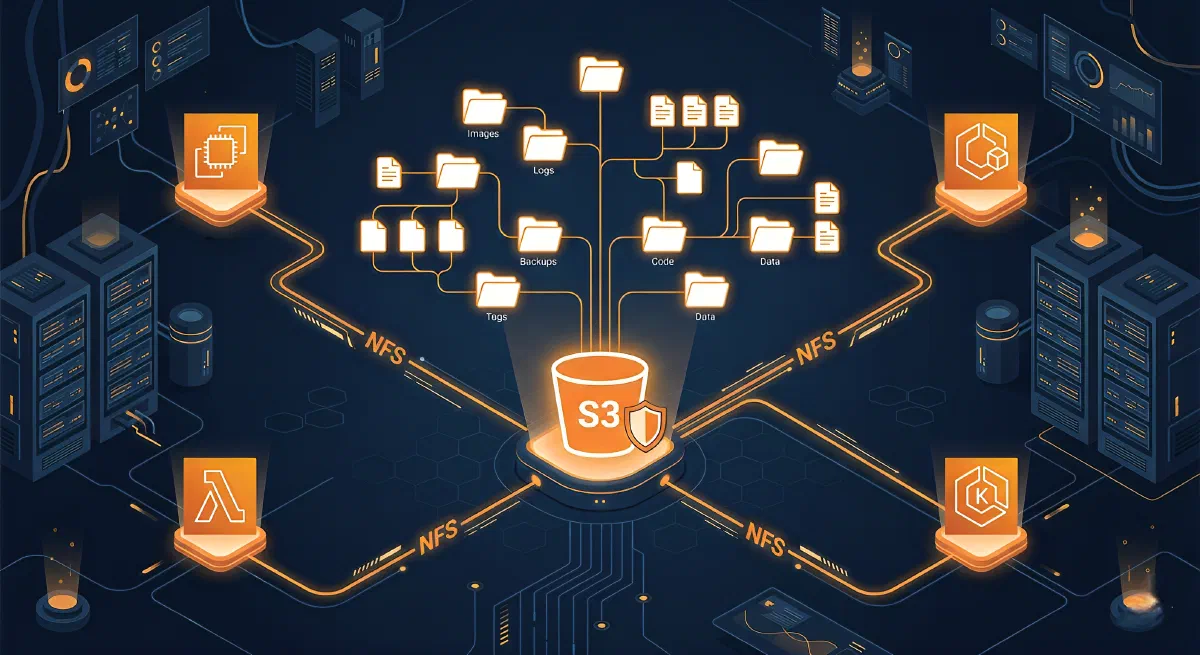
If you’ve ever had to maintain a separate EFS just to give your EC2 or Lambda instances file-system-style access to data that already lives in S3, you know how frustrating that duplication is. You pay twice, sync manually, and still deal with eventual consistency headaches.
AWS just shipped a fix for that: S3 Files.
What Is S3 Files?
S3 Files is a new AWS service that makes S3 buckets accessible as native file systems using NFS v4.1+. Instead of treating your bucket as a key-value store accessed via s3:// URLs, you mount it like a regular directory and use normal POSIX operations: ls, cp, cat, echo >, anything.
Under the hood it runs on Amazon EFS infrastructure and delivers ~1ms latencies for active data. Files that see heavy sequential reads are served directly from S3 to maximize throughput, with byte-range reads to minimize transfer costs.
|
|
How the Caching Works (and Why It Matters for Cost)
This is the part that directly impacts your bill. S3 Files uses an intelligent tiering strategy:
- Files accessed frequently and randomly → cached on the file system’s high-performance storage (~1ms)
- Files read sequentially in large chunks → served directly from S3 (cheaper, higher throughput)
- Byte-range reads reduce unnecessary data transfer
The result: you’re not blindly pulling everything into EFS-priced storage. The system figures out what needs to be fast and what can stay cheap in S3.
Setting Up S3 Files
Via the Console
- Go to S3 → File systems → Create file system
- Enter your bucket name and confirm
- Note the Mount Target IDs from the Mount targets tab
- SSH into your EC2 instance and mount:
|
|
Make sure you have the latest
amazon-efs-utilspackage installed. It comes pre-installed on AWS AMIs.
Via the CLI
|
|
IAM Permissions
S3 Files uses IAM to control access at both the file system and object levels. You’ll need policies that allow the relevant s3files:* and s3:GetObject/s3:PutObject actions for your compute roles.
Shared Access Without Data Duplication
One of the biggest wins here is multi-compute access with a single copy of the data. You can attach the same file system to:
- EC2 instances
- ECS tasks
- EKS pods
- Lambda functions
Before S3 Files, a common workaround was copying data into EFS so multiple services could read it as files, meaning you maintained two copies of the same dataset and paid for both. Now you mount the same S3-backed file system everywhere.
| Scenario | Before | With S3 Files |
|---|---|---|
| Shared training data across EKS pods | Copy to EFS + S3 sync job | Single mount, one source of truth |
| Lambda reading config files | Custom S3 SDK code per function | Standard file I/O via mount |
| EC2 + ECS sharing the same dataset | Manual sync or S3 object access | Shared NFS mount, NFS close-to-open consistency |
Synchronization Behavior
Files written through the file system appear in S3 within minutes. Changes made directly to the S3 bucket (via the CLI or SDK) reflect in the file system within a few seconds, though it can occasionally take up to a minute.
This two-way sync means you can mix access patterns, some services using the mount, others using the S3 API, without maintaining a separate sync pipeline.
What You Pay For
S3 Files pricing has three components:
- Data stored in the S3 file system
- Small file reads and all write operations through the file system
- S3 API requests during synchronization between the file system and the bucket
You do not pay for the underlying S3 storage twice, the objects stay in S3 and you’re charged at S3 rates for storage. The file system layer adds a cost on top for the NFS access and caching infrastructure, but you avoid the full EFS cost for data that doesn’t need permanent high-performance caching.
Where S3 Files Shines
- Agentic AI systems that use file-based Python libraries and CLI tools expecting a real filesystem
- ML training pipelines where multiple nodes need shared read access to datasets
- Applications migrating from on-prem NFS that aren’t ready to rewrite all storage access to S3 SDK calls
- Lambda + file I/O patterns without custom S3 plumbing
When to Stick With FSx or EFS
S3 Files is not the right tool for everything:
- HPC/GPU clusters with Lustre-optimized workloads → use FSx for Lustre
- NAS migrations from Windows or NetApp environments → use FSx for Windows / FSx for NetApp ONTAP
- Sub-millisecond consistent latency at scale with no S3 as the backing store → use EFS directly
Monitoring
CloudWatch metrics and CloudTrail logging are available for all S3 Files operations. Set up latency and throughput alerts the same way you would for EFS, the metrics surface is familiar.
Summary
S3 Files removes one of the most common reasons people maintained redundant storage: giving file-system-style access to data that was already in S3. The intelligent caching model means you’re not paying EFS rates for everything, only for what actually benefits from low-latency access. It’s available in all commercial AWS regions today.
If you have workloads that read S3 data through SDK wrappers just to simulate file access, this is worth evaluating. The setup is straightforward and the cost model is more predictable than maintaining a parallel EFS volume.