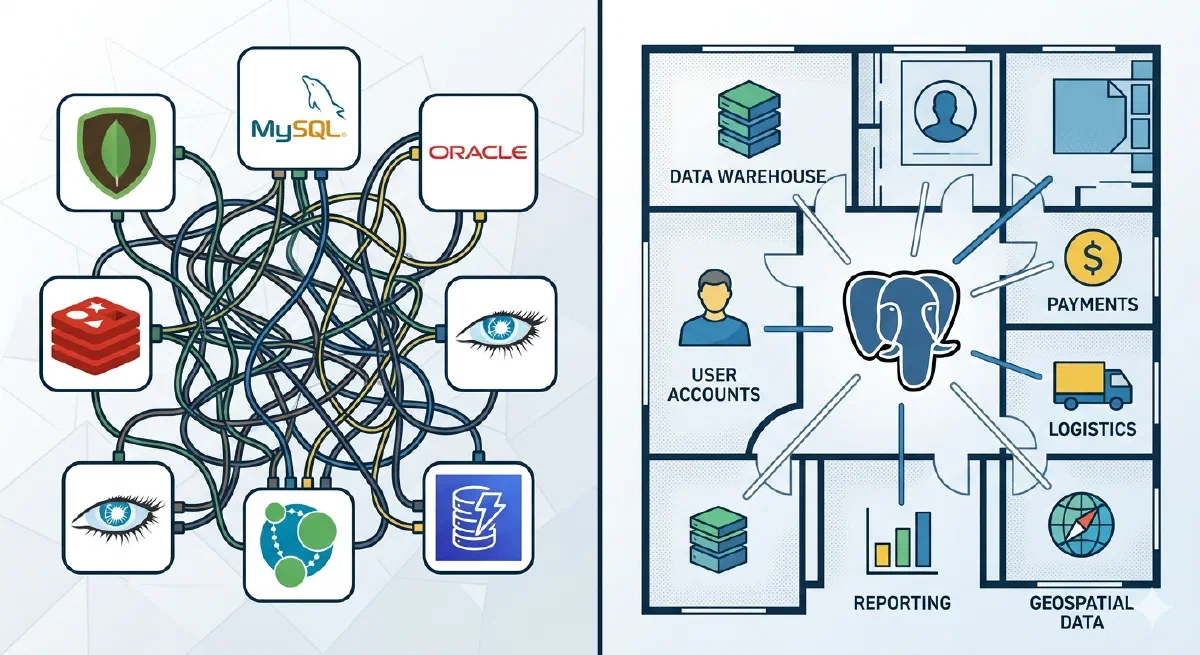
Think of your database like your house. Your house has a living room, bedroom, bathroom, kitchen, and garage. Each room serves a different purpose. But they’re all under the same roof, connected by hallways and doors. You don’t build a separate restaurant just because you need to cook. You don’t build a commercial garage across town just to park your car.
That’s what PostgreSQL is. A house with many rooms. Full-text search, vectors, time series, queues — all under the same roof.
But that’s exactly what specialized database vendors don’t want you to hear. Their marketing teams have spent years convincing you to “use the right tool for the right job.” It sounds reasonable. It sounds wise. And it sells a lot of databases.
Let me show you why this is a trap and why PostgreSQL is the best choice in 99% of cases.
The “Use the Right Tool” Trap
You’ve heard the advice: “Use the right tool for the right job.”
It sounds sensible. So you end up with:
- Elasticsearch for full-text search
- Pinecone for vectors (AI embeddings)
- Redis for caching
- MongoDB for documents
- Kafka for message queues
- InfluxDB for time series
- PostgreSQL for… what’s left
Congratulations. Now you have seven databases to manage. Seven query languages to learn. Seven backup strategies to maintain. Seven security models to audit. Six sets of credentials to rotate. Seven monitoring dashboards to track. And seven things that can break at 3am.
And when something breaks? Good luck building a test environment to debug it.
Here’s a different idea: Simply use PostgreSQL.
Why This Matters Now: The AI Era
This isn’t just about simplicity. AI agents have made database proliferation a nightmare.
Think about what agents need to do:
- Quickly create a test database with production data
- Test a fix or experiment
- Verify it works
- Destroy the environment
With one database? It’s a single command. Fork, test, done.
With seven databases? Now you need to:
- Coordinate snapshots across Postgres, Elasticsearch, Pinecone, Redis, MongoDB, and Kafka
- Ensure they’re all at the same point in time
- Spin up seven different services
- Configure seven different connection strings
- Hope nothing gets out of sync while you’re testing
- Destroy seven services when you’re done
This is virtually impossible without tons of R&D.
And it’s not just agents. Every time something breaks at 3am, you need to create a test environment to debug. With six databases, that’s a coordination nightmare. With one database, it’s a single command.
In the AI era, simplicity isn’t just elegant. It’s essential.
“But Specialized Databases Are Better!”
Let’s address this directly.
The myth: Specialized databases are vastly superior for their specific tasks.
The reality: Sometimes they’re marginally better at a narrow task. But they also bring unnecessary complexity. It’s like hiring a private chef for every meal. It sounds luxurious, but adds expense, coordination overhead, and creates problems you didn’t have before.
The truth is: 99% of companies don’t need them. The top 1% have tens of millions of users and a large engineering team to match. You’ve read their blog posts about how Specialized Database X works incredibly well for them. But that’s their scale, their team, their problems. For everyone else, PostgreSQL is more than enough.
Here’s what most people don’t realize: PostgreSQL extensions use the same or better algorithms than specialized databases (in many cases).
The “specialized database premium”? Mostly marketing.
| Use Case | Specialized DB | PostgreSQL Extension | Algorithm |
|---|---|---|---|
| Full-text search | Elasticsearch | pg_textsearch | ✅ Both use BM25 |
| Vector search | Pinecone | pgvector + pgvectorscale | ✅ Both use HNSW/DiskANN |
| Time series | InfluxDB | TimescaleDB | ✅ Both use temporal partitioning |
| Cache | Redis | UNLOGGED tables | ✅ Both use in-memory storage |
| Documents | MongoDB | JSONB | ✅ Both use document indexing |
| Geospatial | Specialized GIS | PostGIS | ✅ Industry standard since 2001 |
These aren’t simplified versions. They’re the same or better algorithms, battle-tested, open source, and often developed by the same researchers.
The benchmarks confirm this:
- pgvectorscale: 28x lower latency than Pinecone with 75% less cost
- TimescaleDB: Matches or outperforms InfluxDB while offering full SQL
- pg_textsearch: The exact same BM25 ranking that powers Elasticsearch
The Hidden Costs Add Up
Beyond the AI/agent problem, database proliferation has compounding costs:
| Operational Overhead | 1 DB | 7 DBs |
|---|---|---|
| Backup strategy | 1 | 7 |
| Monitoring dashboards | 1 | 7 |
| Security patches | 1 | 7 |
| On-call runbooks | 1 | 7 |
| Failover testing | 1 | 7 |
Cognitive load: Your team needs to know SQL, Redis commands, Elasticsearch Query DSL, MongoDB aggregation, Kafka patterns, and InfluxDB’s non-native SQL workaround. That’s not specialization. It’s fragmentation.
Data consistency: Keeping Elasticsearch in sync with Postgres? You build sync jobs. They fail. Data gets out of sync. You add reconciliation. That also fails. Now you’re maintaining infrastructure instead of building features.
SLA math: Three systems at 99.9% uptime each = 99.7% combined. That’s 26 hours of downtime per year instead of 8.7. Each system multiplies your failure modes.
The Modern PostgreSQL Stack
These extensions aren’t new. They’ve been production-ready for years:
- PostGIS: Since 2001 (24 years). Powers OpenStreetMap and Uber.
- Full-text search: Since 2008 (17 years). Built into Postgres core.
- JSONB: Since 2014 (11 years). As fast as MongoDB, with ACID.
- TimescaleDB: Since 2017 (8 years). 21,000+ GitHub stars.
- pgvector: Since 2021 (4 years). 19,000+ GitHub stars.
Over 48,000 companies use PostgreSQL, including Netflix, Spotify, Uber, Reddit, Instagram, and Discord.
The AI Era Extensions
The AI era brought a new generation:
- pgvectorscale: Replaces Pinecone, Qdrant. DiskANN algorithm. 28x lower latency, 75% less cost.
- pg_textsearch: Replaces Elasticsearch. True BM25 ranking natively in Postgres.
- pgai: Replaces external AI pipelines. Automatic embedding sync as data changes.
What this means: Building a RAG application used to require Postgres + Pinecone + Elasticsearch + integration code.
Now? Just PostgreSQL. One database. One query language. One backup. One fork command for your AI agent to create a test environment.
Quick Start: Add These Extensions
Here’s everything you need:
|
|
That’s it.
Show Me the Code
Here are practical examples for each use case.
Full-Text Search (Replaces Elasticsearch)
The extension: pg_textsearch (true BM25 ranking)
What you’re replacing:
- Elasticsearch: Separate JVM cluster, complex mappings, sync pipelines
- Solr: Same story, different wrapper
- Algolia: $1/1000 searches, external API dependency
What you get: The exact same BM25 algorithm that powers Elasticsearch, directly in Postgres.
|
|
Hybrid Search: BM25 + Vectors in One Query
|
|
This is what Elasticsearch requires a separate plugin for. In Postgres, it’s just SQL.
Vector Search (Replaces Pinecone)
The extensions: pgvector + pgvectorscale
What you’re replacing:
- Pinecone: $70/month minimum, separate infrastructure, sync headaches
- Qdrant, Milvus, Weaviate: More infrastructure to manage
What you get: pgvectorscale uses the DiskANN algorithm (from Microsoft Research), achieving 28x lower p95 latency and 16x higher throughput than Pinecone at 99% recall.
|
|
Automatic embedding sync with pgai:
|
|
Now every INSERT/UPDATE automatically regenerates embeddings. No sync jobs. No drift. No 3am pages.
Time Series (Replaces InfluxDB)
The extension: TimescaleDB (21,000+ GitHub stars)
What you’re replacing:
- InfluxDB: Separate database, Flux query language or non-native SQL
- Prometheus: Great for metrics, not for your application data
What you get: Automatic temporal partitioning, up to 90% compression, continuous aggregations. Full SQL.
|
|
Cache (Replaces Redis)
The feature: UNLOGGED tables + JSONB
|
|
Message Queues (Replaces Kafka)
The extension: pgmq
|
|
Or native SKIP LOCKED pattern:
|
|
Documents (Replaces MongoDB)
The feature: Native JSONB
|
|
Geospatial (Replaces Specialized GIS)
The extension: PostGIS
|
|
Scheduled Jobs (Replaces Cron)
The extension: pg_cron
|
|
The Bottom Line
Remember the house analogy? You don’t build a separate restaurant just to cook dinner. You don’t build a commercial garage across town just to park your car. You use the rooms in your house.
That’s what we’ve shown here. Search, vectors, time series, documents, queues, cache — these are all rooms in the PostgreSQL house. Same algorithms as specialized databases. Battle-tested for years. Used by Netflix, Uber, Discord, and 48,000 other companies.
And what about the 99%?
For 99% of companies, PostgreSQL handles everything you need. The 1%? That’s when you’re processing petabytes of logs across hundreds of nodes, or need specific Kibana dashboards, or have exotic requirements that genuinely exceed what Postgres can do.
But here’s the thing: you’ll know when you’re in the 1%. You won’t need a vendor marketing team to tell you. You’ll have benchmarked yourself and hit a real limit.
Until then, don’t spread your data across seven buildings because someone told you to “use the right tool for the right job.” That advice sells databases. It doesn’t serve you.
Start with PostgreSQL. Stay with PostgreSQL. Add complexity only when you’ve earned the need for it.
It’s 2026. Just use PostgreSQL.
Learn More
- pg_textsearch Documentation
- pgvector on GitHub
- pgvectorscale Documentation
- TimescaleDB Documentation
- pgmq for Message Queues
- PostGIS for Geospatial
This article was inspired by the excellent post “It’s 2026, Just Use Postgres” by TigerData.